
Search engines rank an MSP's website by crawling and indexing its pages first, then scoring how relevant and comprehensive each page is for a given search, then weighing how many quality sites link to it as a vote of trust. A site that's hard to crawl, thin on detail, or short on backlinks will struggle to rank, no matter how good the design looks.
Most MSP owners I talk to have the same complaint: they built a website, added service pages, and then waited for Google to notice.
It didn't.
Or it did, eventually, but the phone still didn't ring. That gap between "we have a website" and "we are findable on Google" is where most MSP marketing budgets quietly disappear. Understanding why that gap exists is the first step toward closing it. The full picture (content strategy, link building, local authority) is what The MSP Content Marketing Playbook covers. This post is narrower: how Google decides what to find, what to keep, and what to rank.
Crawling: How Google Finds Your Service Pages in the First Place
Google doesn't browse your MSP website the way a person does.
It sends automated programs called crawlers, sometimes called spiders or bots, that follow links from page to page across the internet, discovering what exists. If no link points to a page on your MSP website, the crawler may never find it. Discovery works exactly that way: no link, no path, no crawl.
The crawl budget is finite. Google allocates a certain amount of crawling capacity to each website based on how authoritative and active it appears to be. A brand-new MSP website with no inbound links and no crawl history gets a small slice of that budget. A slow site eats more of it per page. A site that returns errors wastes it entirely.
Why a New Service-Area Page Can Take Weeks to Show Up
When you publish a new managed services page for a city you're expanding into, Google doesn't know it exists until a crawler finds it. If the only path to that page is through a buried navigation menu, and Google hasn't crawled your site recently, the page can sit in the dark for weeks. Submitting a sitemap through Google Search Console accelerates this; it gives Google a map of what you want crawled. It doesn't guarantee crawling, but it removes one major point of friction.
How a Buried Nav Menu Can Accidentally Hide Your Best Pages
Click depth matters more than most MSP founders realize. A page that sits three or four clicks from your homepage, nested inside a dropdown, inside a services section, inside a regional submenu, is harder for crawlers to reach and slower to get indexed. Your MSP cybersecurity page shouldn't require four clicks to find. Neither should your managed IT services page. If your navigation structure makes sense to you but buries your highest-intent pages, you're solving the wrong problem.

"Most MSP founders treat SEO like a switch you flip once. It's not. Crawling, indexing, relevance, trust; Google is making four separate judgments about your site, and you can fail any one of them after passing the other three. If you don't know which one is failing, you're just spending money on hope." Ian Richardson, Founder, Fox & Crow Group
Indexing: What Happens After a Page Is Found
Crawling and indexing are not the same thing.
Crawling is Google discovering a page exists. Indexing is Google analyzing that page, deciding it's worth keeping, and storing it so it can appear in search results. A page can be crawled and not indexed, and that happens more often than MSP owners expect.
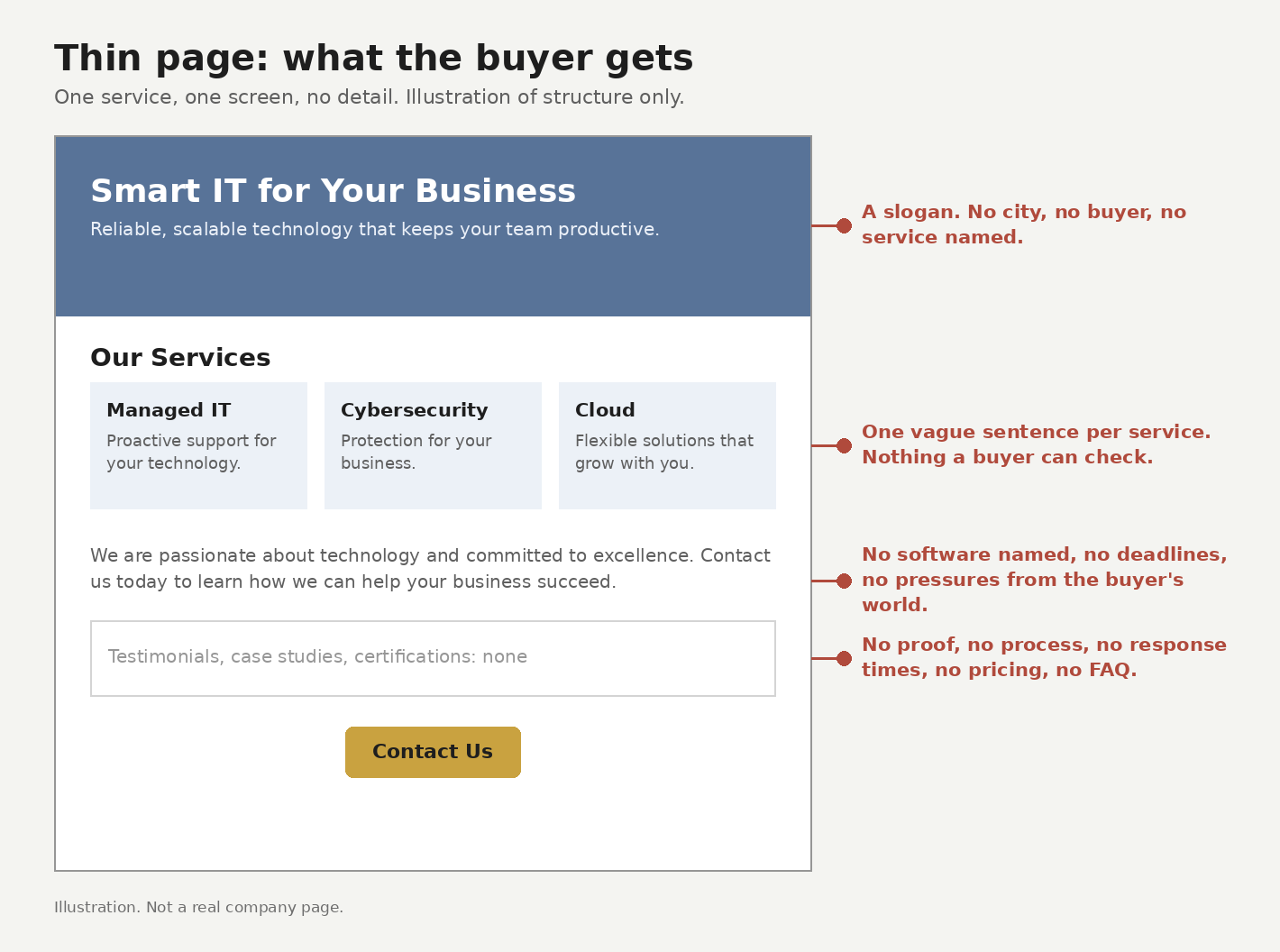
Google decides not to index pages it judges as low-value. Thin content, duplicate content, pages with no original information, pages that are essentially copies of other pages on the same site; all of these are candidates for exclusion. If your MSP website has a managed services page, a managed IT page, and a managed technology page that all say roughly the same thing in slightly different words, Google may index one and ignore the others.
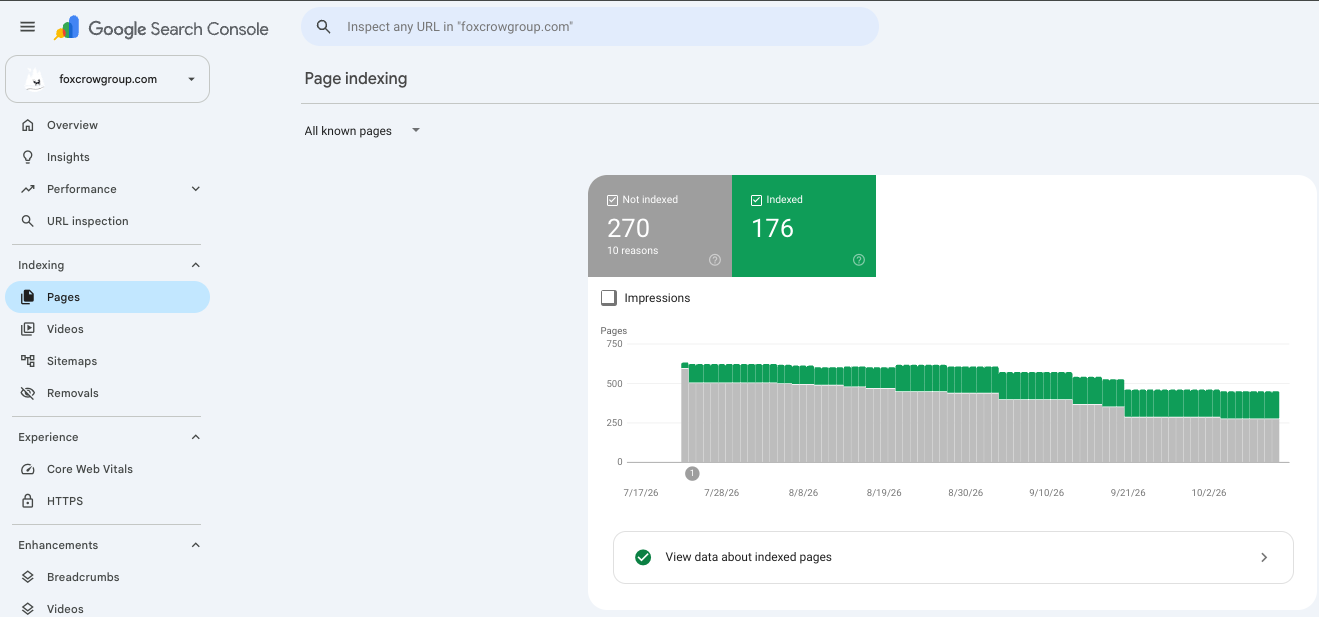
You can see this in Google Search Console. The Page indexing report (called Coverage in older versions of Search Console) shows you which pages are indexed, which are excluded, and why. If you've never opened it, open it this week.
Relevance: Why the Best-Written Service Page Doesn't Always Win
Once a page is indexed, Google has to decide where it ranks for a given search query. Relevance is the first filter.
Google's systems are trying to determine: does this page answer what the person searched for? That judgment is more sophisticated than it used to be. Matching keywords is still part of it. But Google now evaluates whether the full page addresses the topic, the breadth of what's covered, the depth of the answers, the presence of related concepts that a knowledgeable source would naturally include.
Why Comprehensiveness Beats Keyword Stuffing
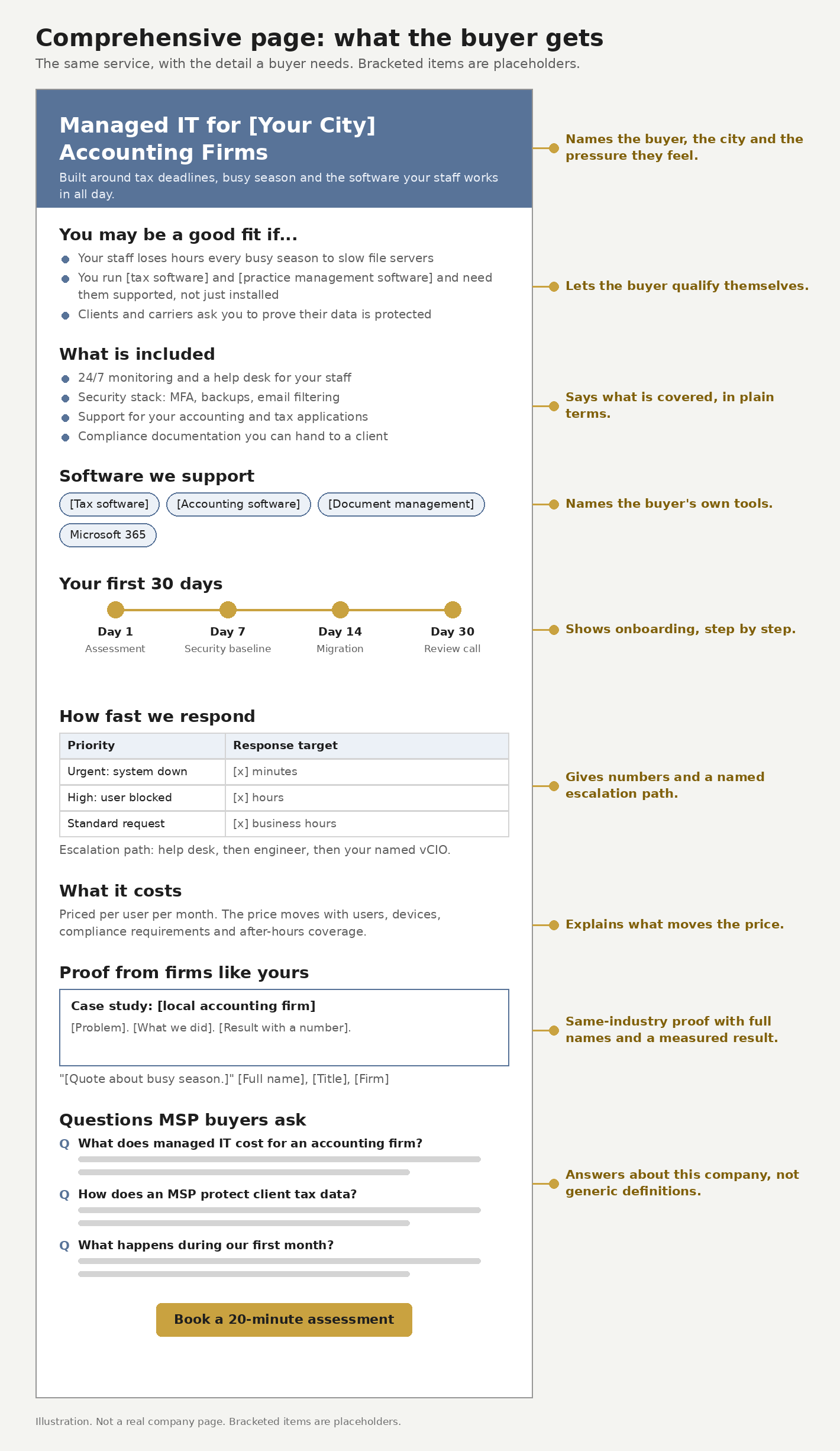
An MSP service page that repeats "managed IT services Dallas" fourteen times, without explaining what's included, what happens at onboarding, or what a client can expect day-to-day, reads as thin to Google's relevance systems. A page that walks through what managed services means, what's covered, what isn't, and how your MSP handles escalations reads as useful, and Google increasingly ranks useful pages over keyword-dense ones.
This doesn't mean writing longer for the sake of length. It means covering the topic the way someone who does this work would cover it.
Answering "What Does This Cost?" Before It's Asked
One of the fastest ways to improve relevance on an MSP service page is to answer the questions buyers are already typing into Google. "What does managed IT support cost?" is one of the most common. MSP websites that address pricing, even in ranges, even with a "depends on" explanation, tend to perform better on those queries than MSP websites that redirect every question to a contact form. Buyers who find an answer on your page have a reason to stay. Buyers who hit a wall have no reason to come back.
Links as Votes: Why They Still Matter for an MSP's Local Authority
Every link pointing to your MSP website from another website is a trust signal.
Not all links carry equal weight. A link from a local Chamber of Commerce page, a regional business journal, or an industry association directory carries more authority than a link from a random directory nobody reads. These links work as a credibility check layered on top of relevance: a page can match the query and still need trust signals like these before Google will surface it as a result.
For MSPs, local links matter most. A link from your city's business association, a local news feature, a partner vendor's website; these are the signals Google uses to anchor your authority in a specific geography. Fox & Crow Group's own guide to MSP local SEO walks through that geographic layer in more depth. If your MSP serves the greater Denver market and no Denver-based website links to you, you're starting from nothing on local trust. How links are valued in the MSP market goes deeper into how that authority gets calculated.
Links also accelerate crawling. When another site links to a new page on your MSP website, Google's crawler follows that path and discovers the page faster than it would through a sitemap alone. Building links is a discovery strategy as much as a ranking one.
Why AI-Generated Content Is Changing What Google Rewards MSP Sites For
For years, the formula was simple: write a service page, hit the right keywords, get a few links, rank. That formula still works in low-competition markets. But Google is increasingly aware that most of the content being published right now, including content on MSP websites, was generated by AI, follows the same structural templates, and contains no original observation or experience.
The Shift Toward Real Human-Experience Signals
Google's quality guidelines now name this explicitly as experience: direct, first-hand contact with a topic that a writer only gets by doing the work. An MSP service page that describes what it's like to onboard a 50-person law firm, what problems typically surface in week one, and how your team handles them signals something that a templated AI page can't: a real person did this work and wrote about it.
This shift changes what good MSP content looks like. Generic service descriptions are everywhere online. An MSP that writes about its own law firm onboarding, the week-one problems that came up, and the fixes its team made is one of a shrinking number of sites doing that in public, and Google's quality systems are built to notice the difference.
Frequently Asked Questions
Why isn't my MSP website showing up on Google? An MSP website usually isn't showing up on Google for one of three reasons: the page hasn't been crawled yet, it's been crawled but judged too thin to rank, or it has almost no links pointing to it as trust signals. Each has a different fix, which is why diagnosing the actual cause matters before spending money on solutions.
How long does it take for a new MSP website page to start ranking? A new MSP website page can be crawled and initially indexed within days to a few weeks, but real movement in rankings, showing up on page one for a relevant query, typically takes longer, as the page earns relevance and link signals over time.
Does website navigation structure affect MSP SEO? Website navigation structure affects MSP SEO because pages buried several clicks deep in a menu are harder for search engines, and buyers, to find, and can sit uncrawled far longer than pages linked prominently from the homepage.
What's the difference between crawling and indexing for an MSP website? For an MSP website, crawling is Google discovering a page exists, while indexing is storing and analyzing it so it's eligible to appear in results; a page can be crawled but not indexed if it's judged low-value.
Do backlinks help a new MSP page rank faster? Backlinks help a new MSP page rank faster by acting as a discovery path for crawlers and a trust signal for ranking, which is why how links are valued in the MSP market is worth reading next.
What This Means for Your MSP Website This Week
Open Google Search Console and pull your Page indexing report.
Look at what's indexed, what's excluded, and why. Then look at your navigation and count the clicks it takes to reach your most important service pages. If any of your core MSP service pages are buried more than two clicks deep, that's the first structural problem to fix, before content, before keywords, before anything else.
If you want a practical starting checklist for MSP SEO, the MSP SEO 101 guide walks through the foundational steps in order.
If you'd rather see the whole picture at once, a Jackdaw reading summarizes your site's SEO findings, such as orphan pages, missing canonicals and schema gaps, ranks them by severity, and sets them against your local competitors.
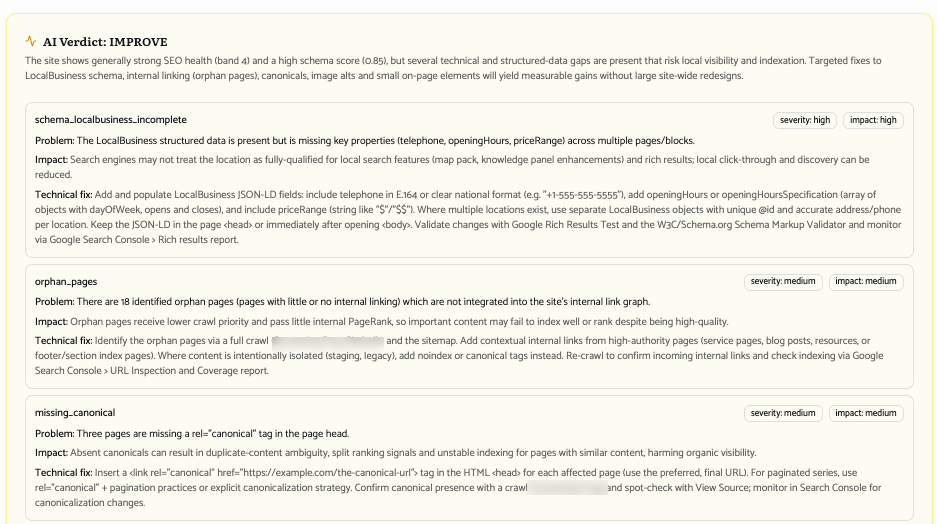
Start with what you can see. You'll have enough to fix for the next month without looking any further.