
How to claim your business on ChatGPT Business Hub: 8 quick steps for MSPs
- Sign in with a company-owned account. Use a ChatGPT account your MSP controls, not a technician's personal login.
- Open ChatGPT Business Hub. Select Business Hub from the ChatGPT sidebar, or go to chatgpt.com/business-hub.
- Find your listing. Search for your MSP by business name or domain and select the matching listing.
- Verify your claim. Choose business phone, business email, website domain, or Shopify. Use the website domain (DNS TXT record) option if it's offered.
- Wait for OpenAI's approval. OpenAI emails you a decision or a request for more information.
- Complete Persona identity verification. Have a government ID ready and enter your legal business name, address, and registration number exactly as they appear on your official records. Approval adds the blue verified badge.
- Fill in your ChatGPT business profile. There’s no managed services category, so research the options before you pick one. Describe who you serve, where you serve them, and what you deliver, in the words a buyer would use.
- Check Insights monthly. Review mentions, website clicks, and discovery topics, and turn recurring topics into website pages. Skip the Business Agent for now.
Claiming your ChatGPT business listing is free at launch, and it won't raise your ranking in ChatGPT on its own. The rest of this post covers what can go wrong at each step and how your listing fits with your marketing and sales.
Get help with your MSP AI marketing plan, schedule a call with Carrie Richardson.
Why your MSP should claim its ChatGPT business listing now
A claimed ChatGPT business listing lets you correct what ChatGPT says about your MSP and shows you how often it sends buyers to your website. It won't move you up in ChatGPT's recommendations on its own.
A prospect shopping for a new IT provider can now ask ChatGPT for three MSPs in their city, read a comparison, and click through to one website without ever seeing a Google map pack. Until November 10, 2026, your MSP had no say in what ChatGPT told that prospect about you.
OpenAI changed that with Businesses in ChatGPT, a beta that lets an owner or authorized representative claim a listing through Business Hub, correct the details, and see how often ChatGPT mentions the business and sends clicks to its site. OpenAI says ChatGPT reaches 1.2 billion people a week.
Most of the guides published since launch get the important details wrong. They promise ranking boosts, bookings inside the chat, and AI sales reps that close deals. OpenAI's own setup guide says none of that, and it is the source this post follows. Everything below is written for MSPs, IT support providers, VARs, and technology service providers, and it covers what the other guides skip: what to have ready, which verification method makes sense for an MSP, where claims fail, how to read the numbers, and how your listing fits into the rest of your marketing and sales.
Table of Contents
- How to claim your business on ChatGPT Business Hub: 8 quick steps for MSPs
- Why your MSP should claim its ChatGPT business listing now
- What ChatGPT Business Hub gives your MSP, and what it doesn't
- Check whether your MSP can claim a listing yet
- Get these things ready before you start the claim
- How to claim your ChatGPT business listing, step by step
- Insights stop counting at the click
- Our AI search impressions grew more than 2,000x in six months
- ChatGPT Business Hub dos and don'ts for MSPs
- Hold off on a ChatGPT Business Agent for now
- Your ChatGPT listing is one layer of your MSP's visibility
- AI mentions only pay off when sales and marketing work the same lead
- Warn your clients about the scams riding this launch
- Learn more about how MSPs are using AI
- Get ready to claim, but don’t rush the category
- Frequently Asked Questions
- About the author
What ChatGPT Business Hub gives your MSP, and what it doesn't
Business Hub is where a business manages its presence in ChatGPT. It bundles four separate things, and most MSPs only need the first two.
Your business profile. After verification you can update your website, business description, product or service category, logo, cover photo, and policies. OpenAI reviews every change before it publishes, and the content has to follow the Businesses in ChatGPT policy.
Insights. A dashboard of aggregate activity over the past 28 days: mentions, website clicks, and the discovery topics that come up in answers that reference your business.
A product feed. Built for businesses that sell physical or catalog products, with prices and availability. Most MSPs can skip it.
A Business Agent. An optional, separately published chat assistant that answers customer questions about your products and policies. It has its own eligibility rules, and we recommend MSPs wait on it. More on that below.
Here is what Business Hub does not do, in OpenAI's own words. Claiming "doesn't guarantee increased visibility or give you direct control over ChatGPT's independent recommendations." Advertising "doesn't influence ChatGPT's independent answers." Businesses "don't receive individual prompts or consumer conversations." Claiming a profile or disputing ownership doesn't change its visibility in ChatGPT.
ChatGPT is already describing your MSP to prospects, using whatever it found on the open web. That might be your current website. It might also be an old directory listing with your previous address, a review site with the wrong service area, or a press release from three acquisitions ago. A claimed, verified listing puts accurate, owner-supplied information into the mix and gives you the first real data on how often ChatGPT points buyers at you.
You don't need a ChatGPT Enterprise agreement or an Ads account to claim a listing. Industry press reported that claiming and managing a profile is free at launch, and that OpenAI left the door open to charging later.
Check whether your MSP can claim a listing yet
You can claim a business if you own it or are authorized to represent it, and you'll need to verify that connection and be approved.
Availability depends on where your business is and what kind of business it is. OpenAI's guide says local stores and restaurants can currently claim only an existing U.S. listing. Eligible online businesses may see an option to add a new one. Outside the U.S., claiming depends on whether ChatGPT is available and the required verification is supported in your country.
That matters for MSPs because most of you are local service businesses, even when most of your support is remote. Early users report that Business Hub asks how customers interact with you, at a physical location or through a website, and that choice changes how your mentions get counted, which we cover in the Insights section.
Early reports from businesses going through the process say Business Hub is still rolling out gradually, and many local service businesses are getting a waitlist message instead of a claim button. If that's you, prepare everything in the next section now so the claim takes minutes when your turn comes.
Two other situations to know about:
- Your listing is locked. If you see "Contact support," the listing is locked. Use that button to request access.
- Your listing requires a tenant admin. If your MSP runs a ChatGPT Enterprise workspace, the designated administrator of that workspace has to start the claim from their own account. That may not be the same person who runs your website or your ad accounts.
Get these things ready before you start the claim
Sort these out before you click anything. Each one can stall a claim or a Persona check.
A company-controlled ChatGPT account. The account you claim with becomes the admin account, and teammate and agency invitations can depend on it. Don't claim with a technician's personal login or the account of a marketing coordinator who might leave next year. Decide who owns this listing the same way you'd decide who owns your domain registrar account.
Registration details that match your records exactly. Persona checks the legal business name, registered address, and any registration or tax number against your official records. OpenAI's guide is specific here: the legal-name field gets the name on your registration documents, and your brand name goes in the separate trade-name or "doing business as" field if one is offered. If your MSP goes to market under a brand but is registered as an LLC with a different name, enter the LLC in the legal-name field.
Identity documents. You may need a government-issued ID, business registration information, and proof that you're authorized to represent the business. Early users report the Persona flow can also ask for a live face video, so the person verifying should be ready to do it themselves.
DNS access. Domain verification uses a TXT record. If your MSP manages its own DNS, you already have what you need. If a former web vendor still controls your registrar, sort that out first.
Consistent business details everywhere else. ChatGPT still pulls from other sources when it answers questions about your business. If your website, Google Business Profile (the listing that puts your MSP on Google Maps and in local search results, once called Google My Business), LinkedIn page, and directory listings show different addresses, phone numbers, or service areas, fix those before you write your ChatGPT description so all of them say the same thing.
Want help getting your MSP ready to claim?
Jackdaw can help with:
- MSP competitive intelligence reports. See how your MSP compares to your local competitors. Request a Reading.
- Free MSP marketing training. Work through the free MSP marketing guide at your own pace.
- One-off MSP marketing strategy. A single engagement to build your MSP's marketing plan.
- Fractional MSP marketing leadership. Ongoing marketing leadership for MSPs that aren't ready for a full-time hire.
Get help with your MSP AI marketing plan, schedule a call with Carrie Richardson.
How to claim your ChatGPT business listing, step by step
Step 1: Open Business Hub and find your listing. Sign in to ChatGPT with the account you'll use to manage the business. Open Business Hub from the sidebar, or go directly to Business Hub. Search by business name (searching by domain also works for many businesses), select the listing that matches your MSP, and confirm the ChatGPT account you'll use to manage it.
Step 2: Choose your verification method. Business Hub only shows the methods available for your listing. The options are:
- Business phone: a code by text message or automated call to the number shown on the listing.
- Business email: a code sent to the email address associated with the business.
- Website domain: a TXT record you add to your domain's DNS settings.
- Shopify store: for businesses that sell through Shopify. Not relevant for most MSPs.
For most MSPs, domain verification is the cleanest choice when it's offered. The phone number on your listing may route into a phone tree, an after-hours answering service, or a queue that won't capture a text message. The email on file may be a shared info@ inbox nobody watches. A TXT record avoids both problems, and you don't have to change the public phone number on your listing to use it.
To verify by domain, copy the record type, name or host, and value exactly as ChatGPT shows them. DNS changes can take time to appear. Return to ChatGPT, select Verify domain, and finish the remaining prompts.
Step 3: Wait for claim approval. OpenAI reviews the claim and emails you a decision or a request for more information. You can cancel while it's under review. Don't submit duplicate claims while one is pending. If you need to find a claim later, sign in with the same ChatGPT account you used to start it, open Business Hub, select Business, and open the existing profile.
Step 4: Complete Persona identity verification. Claim verification proves your connection to the business. Persona verifies the person. You need Persona approval to publish changes, view Insights, connect a product feed, or create a Business Agent, even if you already verified your domain. The blue verified badge appears only after Persona approval. Claiming alone doesn't give you the badge.
To start, open the Business tab, select your profile, find Complete verification with Persona in the overview, and follow the prompts. If you're creating a brand-new profile through Persona, OpenAI's approval publishes the profile automatically with no separate publishing step, so have your description ready before you submit.
If Persona fails or expires, follow the instructions in the email. If Try again is available, correct the information and resubmit. Submitting to Persona doesn't mean you're approved, and features stay locked until you are.
Step 5: Build out your profile. Once your claim and Persona are approved, open your profile in Business and fill in every field that applies: website, business description, service category, logo, cover photo, and any optional details offered. Delivery and return policies rarely apply to an MSP.
Take your time on the category. There’s no managed services option, and most MSPs could reasonably fit more than one of the categories offered. Research them before you start, and if you’re not sure which one fits your MSP, get help with your MSP AI marketing plan.
The description is where most MSPs will waste the opportunity. ChatGPT matches businesses to what a buyer asks for. A buyer asks for "an IT company in our area that works with dental practices and handles HIPAA," not for "an innovative, customer-focused technology solutions provider." Write the description the way a buyer would describe the MSP they're looking for:
- Who you serve: the industries and company sizes you're best at.
- Where you serve: the cities, counties, or regions you cover.
- What you deliver: fully managed IT, co-managed IT, cybersecurity, compliance support, cloud and Microsoft 365, projects.
- Proof you can stand behind: certifications and partner status you hold today.
Leave out anything you can't back up. OpenAI's policy applies to what you write, and a buyer who gets a different answer from your website than from ChatGPT will trust neither.
OpenAI reviews and publishes changes, so updates take time to show up, and ChatGPT may still draw on other sources. A saved change doesn't mean every answer reflects it right away.
Step 6: Add your team and your agency the right way. The admin who claimed the business can add teammates in Business Hub and grant an agency access to manage the business or its agent. Each person uses their own ChatGPT account. Never forward a personal claim invitation to give someone access, and don't share the admin login. For a business claimed inside a ChatGPT workspace, invitees may need to be members of that workspace.
If someone else already claimed your MSP: open the profile, select the more options menu (•••), choose Dispute ownership, and verify through Persona that you're authorized to represent the business.
If you started a draft by mistake: only unpublished drafts can be deleted, from the three-dot menu on the profile Overview. OpenAI Support can't delete, unpublish, or hide a published profile as part of a setup or ownership request.
Insights stop counting at the click
After your claim and Persona are approved, select Insights on your business. Everything there is aggregate activity over the past 28 days, and you never see individual prompts or conversations.
Mentions are counted differently depending on the type of business. For an online business, a mention counts only when ChatGPT references the business's website. Your brand name appearing in an answer doesn't count. For a local business, a mention counts when ChatGPT shows a result for that location, even if the person never opens the listing or visits your site. Keep that in mind before you compare your numbers to anyone else's.
Website clicks show how often people clicked through to your site. Clicks are the clearest sign in Business Hub that a buyer took a step beyond reading an answer. Early users report that only a small share of mentions turn into clicks, so don't expect the two numbers to track closely.
Discovery topics group the themes that came up in answers that mentioned or cited your business. They're categories, not the questions people typed, and OpenAI says they don't directly measure customer intent.
A blank metric doesn't mean zero activity. It can mean activity hasn't reached the reporting threshold, data is still being collected, or reporting isn't available. If a metric stays blank, contact OpenAI Support.
The most useful thing in this dashboard for an MSP is the discovery topics list. If "co-managed IT" or "cybersecurity for law firms" keeps showing up and your website has no page that answers it, you've found a content gap. If a service you sell never shows up, ChatGPT doesn't have enough evidence that you sell it.
Our AI search impressions grew more than 2,000x in six months
Our impressions in Google’s AI features grew more than 2,000x in the last six months. We’re seeing AI visibility in our own numbers, not just writing about it.
We're excited to finally have a way to put a KPI around AI impressions. The Google Search Console report below shows 13.3K Generative AI impressions for Fox & Crow Group over the last six months, compared with 6 in the previous six months. Those are Google's Generative AI impressions, not a count of ChatGPT mentions. They give us another way to measure how often our content is appearing in AI search.
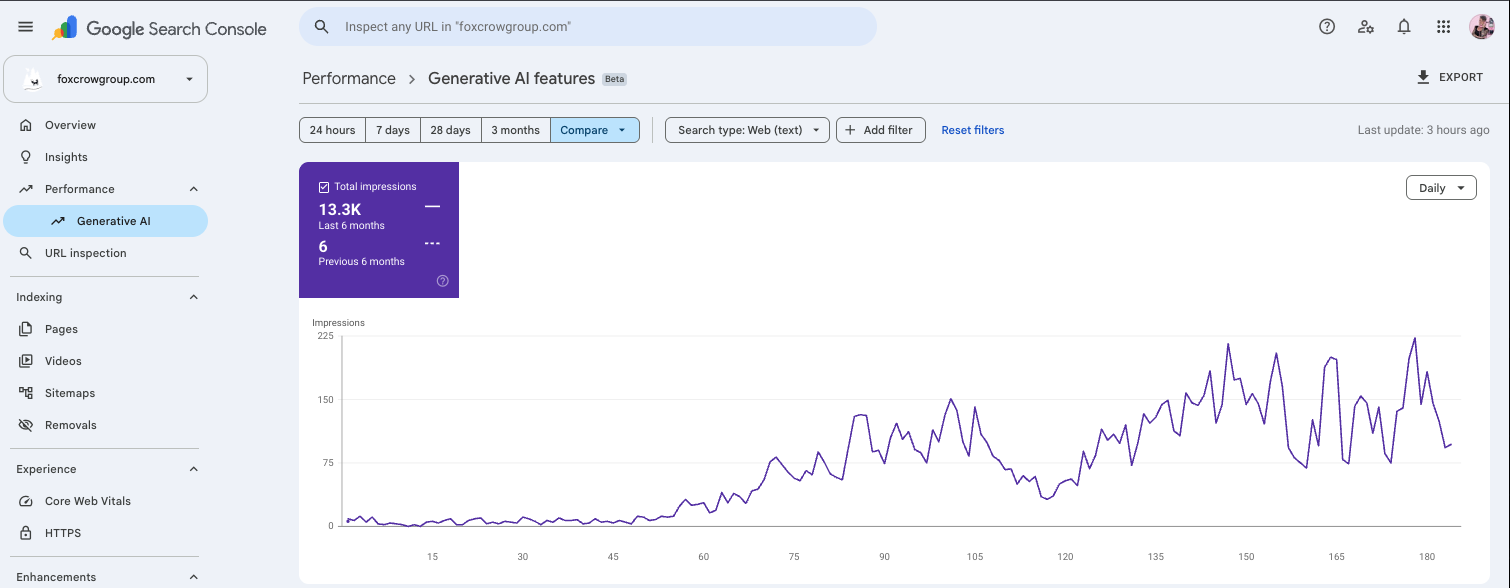
For MSPs, the opportunity is to connect visibility reporting with what happens after a buyer sees you. We want to track AI impressions alongside Business Hub mentions, website clicks, and the lead-source answers our sales team records. More impressions do not automatically mean more first-time appointments or revenue, but it gives us a visibility number we can connect to that work.
ChatGPT Business Hub dos and don'ts for MSPs
Do:
- Claim from a company-controlled account and decide now who administers it.
- Use domain verification when your listing offers it.
- Enter your legal name exactly as registered, with your brand in the trade-name field.
- Write the description in the language a buyer uses to describe the MSP they want.
- Keep your website, Google Business Profile, LinkedIn page, and directories consistent with your ChatGPT profile.
- Give your marketing agency access through Business Hub invitations, with its own accounts.
- Review Insights monthly and use discovery topics to plan website pages and content.
- Measure what happens after the click in your own analytics and CRM.
Don't:
- Expect claiming to raise your MSP's ranking or recommendation rate. OpenAI says it doesn't.
- Buy ads expecting them to change ChatGPT's independent answers. OpenAI says they don't.
- Forward a claim invitation or share the admin login with a vendor.
- Resubmit claims or Persona checks while one is pending.
- Submit registration details that don't match your official records.
- Start a new profile through Persona before your description is ready, since approval publishes it automatically.
- Rush your category. Research the options and choose on purpose.
- Publish a Business Agent yet.
- Pay anyone who promises to remove another business's listing or guarantee placement in ChatGPT.
Hold off on a ChatGPT Business Agent for now
A Business Agent is an assistant that answers customer questions using information you provide. ChatGPT labels the conversation so the buyer knows they've switched from the general assistant to one representing your business. Some coverage has described it as an AI sales rep. We recommend MSPs wait until more is known about it.
Most MSPs aren't eligible yet. Agents are available to eligible U.S. ecommerce and online service businesses with a website that meet the industry requirements in the Business Agents Policy. A verified profile alone doesn't establish that you can create one.
The agent also can't do what most people assume. OpenAI says it can't complete purchases, make bookings, or check a customer's order. It explains products and policies and links to your website, where the buyer completes the action.
You won't see the conversations either. Businesses don't receive chats with their Business Agents. If your agent gives a prospect a wrong answer about scope, response times, or pricing, you won't find out from the transcript.
The commercial terms are still moving, too. OpenAI lets selected advertisers make a Business Agent the destination for an ad, in a limited Sponsored Agents test, and press coverage of the launch reported OpenAI may charge for agents in the future.
Think about what an agent would be doing for an MSP. You wouldn't let a brand-new rep answer pricing and scope questions for a 40-seat medical practice without running discovery first. An agent you can't monitor, answering questions that should start a first-time appointment, carries the same risk with less oversight. Wait until OpenAI publishes more about how agents are evaluated, priced, and reported, then decide.
Your ChatGPT listing is one layer of your MSP's visibility
A claimed listing sits on top of everything else your MSP has published. ChatGPT may draw on other sources when it answers questions about your business, so the listing works best when the rest of your footprint already says the same thing.
| Google Business Profile | ChatGPT business listing | |
|---|---|---|
| Where buyers see it | Google Search and Maps results | ChatGPT answers and recommendations |
| What you control | Hours, categories, services, photos, posts, review replies | Website, description, category, logo, cover photo, policies |
| Verification | Google's own verification flow | Phone, email, DNS TXT, or Shopify, plus Persona identity check |
| What you can measure | Profile views, searches, calls, website clicks | 28-day mentions, website clicks, discovery topics |
| Does claiming change ranking? | Completeness and reviews affect local results | OpenAI says claiming doesn't guarantee visibility |
Your Google Business Profile still carries local search. Buyers still check Google, and your reviews, categories, and service area there remain the public record AI systems and buyers both read. Fox & Crow Group's guide to MSP local SEO covers that layer in depth.
Name, address, and phone consistency still matters. AI answers inherit the mess when your MSP shows three different addresses across directories. The same signals that help search engines find, read, and rank your MSP website help AI systems decide which version of your business is true.
Your website and structured data feed AI answers. Pages that name your services, industries, and service area in plain language, marked up with LocalBusiness, Organization, Service, and FAQPage schema, give AI systems something specific to cite. Fox & Crow's Instinct research on how MSPs show up in AI search is the place to see where the managed IT services field stands on this. If you want the broader picture first, Instinct's study of search visibility across 37,394 firms in the managed IT space shows how many MSPs struggle to be found in traditional search before AI search even comes into it.
Reviews and reputation still count. Recommendation engines weigh what other people say about you. A steady, honest review program on the platforms your buyers use supports every listing you own.
Content answers the questions buyers ask. Discovery topics tell you which themes ChatGPT already associates with you. Pages and posts that answer the questions behind those themes give it more to work with. If you're building that content plan now, start with the three pillars of MSP content marketing.
Measure the result in your own systems. Business Hub stops counting at the click. Watch for chatgpt.com as a referral source in your website analytics, and track what those visitors do next: form fills, calls, and booked meetings. Referral data only catches buyers who click straight through, so many AI-sourced leads won't show up there. The next section covers how to catch the rest.
AI mentions only pay off when sales and marketing work the same lead
An AI mention is the start of a sales conversation that marketing doesn't finish. A prospect who clicks through from ChatGPT has often just read a comparison of several MSPs. If that form fill sits in a shared inbox until someone gets around to it, you earned the visibility and lost the lead to whichever MSP called back first.
MSP owners who treat AI visibility as a marketing project end up with a nice dashboard and no idea whether it produced revenue. In a professional growth program, marketing and sales work from the same plan, and each owns a piece of what happens after the mention.
Marketing owns the listing and what feeds it. That means the ChatGPT profile, the website pages, the review program, and a monthly review of Insights. Marketing turns discovery topics into pages and content, and keeps every public listing consistent.
Sales owns speed and source. Every inbound lead gets a fast response, and every first-time appointment starts with the question "How did you find us?" The answer goes into the CRM as a lead source, with ChatGPT or AI search as its own option. Without that field, the MSP owner can't tell an AI-sourced deal from a referral.
Ask every inbound lead how they found you, on every call. AI search mentions are close to impossible to track right now. Business Hub shows how often ChatGPT mentioned you and how many people clicked through. What those people did next doesn't get measured: the Google search for your company name, the call to your main line three days later, the visit typed straight into the browser. None of it shows up as AI traffic. If your SEO looks like it's failing, ask your inbound leads before you cut the budget.
This year, 95% of Fox & Crow Group's leads told us they found us through an AI search engine. That doesn't show up in our Google Search Console or GA4 reports. We can see how often we were mentioned in AI search, but not what people did after, and the only reason we know where those leads came from is that we ask on every call.
Both sides trade what they hear. The questions prospects ask on discovery calls go back to marketing and become the language in your profile description, your service pages, and your FAQ. Discovery topics from Business Hub go to sales as early warning of what buyers are asking about.
The MSP owner reviews the whole chain. Mentions, then clicks, then form fills and calls, then first-time appointments, then proposals, then signed agreements. If clicks rise and appointments don't, look at your website and your follow-up before you blame ChatGPT. If appointments rise and proposals stall, look at discovery.
That's how we run growth programs at Fox & Crow Group, with marketing and sales working from the same plan instead of handing leads over a wall. I wrote about a related gap on SmarterMSP, where MSP founders build AI credibility on LinkedIn while their companies stay invisible: The Hidden AI Marketing Problem in the MSP Industry. Claiming your ChatGPT listing is a practical first step toward closing it.
Ian Richardson, Founder and CEO of Fox & Crow Group, Inc., the makers of Fox & Crow Jackdaw, made the bigger version of this point on the Technology Reseller podcast at CVxExpo 2026. MSPs are selling AI, but most aren't marketing it effectively, and there is still time for an MSP to be the one that defines the category and the service offerings in its market. A buyer can already ask ChatGPT which MSP in their city handles AI readiness or a Copilot rollout. The MSPs that show up in those answers, with a website and a listing that say clearly what they deliver, set the expectations buyers bring to every other MSP's sales call. Ian also talked about pushing the boundaries of AI with Authority Magazine.
Want marketing and sales working the same plan?
Jackdaw can help with:
- MSP competitive intelligence reports. See how your MSP compares to your local competitors. Request a Reading.
- Free MSP marketing training. Work through the free MSP marketing guide at your own pace.
- One-off MSP marketing strategy. A single engagement to build your MSP's marketing plan.
- Fractional MSP marketing leadership. Ongoing marketing leadership for MSPs that aren't ready for a full-time hire.
Get help with your MSP AI marketing plan, schedule a call with Carrie Richardson.
Warn your clients about the scams riding this launch
Your clients are going to hear about ChatGPT business listings, and some of them will get pitched by someone shady before they hear it from you. Warn them first.
Shared or discounted "ChatGPT Business seats." Forums and marketplaces are full of people reselling seats in workspaces they control. The buyer has no control over the workspace, the data in it, or whether access disappears next month. A ChatGPT Business workspace should belong to the business using it, paid directly.
Unexpected emails about workspaces or claim invitations. Users have reported confusing messages about business workspaces they didn't create. Teach clients to check status by signing in to ChatGPT directly instead of clicking links in an email.
Anyone selling removals or guaranteed placement. OpenAI Support can't delete, unpublish, or hide a published profile as part of a setup or ownership request, and OpenAI says claiming doesn't guarantee visibility. Anyone promising either one for a fee is selling something OpenAI says it doesn't do.
Someone else claiming the business. The fix is free: open the profile, choose Dispute ownership, and verify through Persona.
This makes a good short client newsletter item or QBR talking point, and it reminds clients that their MSP is watching the AI tools their staff are already using.
Learn more about how MSPs are using AI
- West McDonald on the economics of AI for MSPs, from the WIN podcast on Fox & Crow Group
- Matt Tomlinson on how MSPs are using AI
- Peter Conway on how MSPs can build better business application partnerships
- Ian Richardson on pushing the boundaries of AI, in Authority Magazine on Medium
- MSPs are selling AI, but are they ready to sell it?, Ian Richardson on the Technology Reseller podcast at CVxExpo 2026
Get ready to claim, but don’t rush the category
Get your account, registration details, and DNS access ready so the setup itself goes quickly. Then slow down for the one decision that deserves it: your business category.
There’s no managed services category in ChatGPT, for the same reason there’s no SIC or NAICS code for “MSP.” Managed services is a business model, not an industry. Most MSPs could reasonably fit more than one of the categories on offer, and the one you pick tells ChatGPT what kind of business you are. The category screen comes partway through setup, so do this research before you sit down to claim. Look at how your competitors are listed, compare the options against the services you lead with, and choose on purpose. If that takes a week, take the week.
Once Insights start coming in, the work moves back to fundamentals: website pages that answer what buyers ask, listings that agree with each other, a sales team that responds fast and logs the lead source, and a clear picture of how your MSP compares to the other MSPs a buyer is weighing.
A Jackdaw reading shows you exactly that comparison: how your MSP shows up next to your local competitors in search, in reviews, on your website, and in AI-search readiness, before a prospect makes the comparison for you.
Ready to put this to work?
Jackdaw can help with:
- MSP competitive intelligence reports. See how your MSP compares to your local competitors. Request a Reading.
- Free MSP marketing training. Work through the free MSP marketing guide at your own pace.
- One-off MSP marketing strategy. A single engagement to build your MSP's marketing plan.
- Fractional MSP marketing leadership. Ongoing marketing leadership for MSPs that aren't ready for a full-time hire.
Get help with your MSP AI marketing plan, schedule a call with Carrie Richardson.
Frequently Asked Questions
How does an MSP claim its business on ChatGPT? An MSP claims its business on ChatGPT by signing in with a company-controlled ChatGPT account, opening Business Hub from the sidebar, selecting its listing, and verifying the connection by business phone, business email, a DNS TXT record, or Shopify. After OpenAI approves the claim, the person managing the listing completes Persona identity verification before publishing changes or viewing Insights.
Is ChatGPT Business Hub free for MSPs? ChatGPT Business Hub is free for MSPs to claim and manage a profile at launch, according to press coverage of the launch, and OpenAI has left open the possibility of charging in the future. You don't need an Ads account or a ChatGPT Enterprise agreement to claim an eligible business.
Does claiming a ChatGPT business listing help an MSP get recommended more often? Claiming a ChatGPT business listing does not help an MSP get recommended more often by itself. OpenAI says claiming doesn't guarantee increased visibility or give direct control over ChatGPT's independent recommendations, and advertising doesn't influence those answers. It does let you supply accurate information and see Insights.
How can an MSP track leads that come from AI search? An MSP can track leads that come from AI search by asking every inbound lead how they found the MSP and logging the answer as a lead source in the CRM. Business Hub shows mentions and website clicks, but Google Search Console and GA4 don't show what a buyer did after reading an AI answer, so AI-sourced leads can look like direct traffic or branded search.
Which verification method should an MSP use for ChatGPT Business Hub? The verification method an MSP should use for ChatGPT Business Hub is usually website domain verification, when the listing offers it. A DNS TXT record avoids codes getting lost in a phone tree, an answering service, or a shared inbox, and it doesn't require changing the public phone number on the listing.
Why can't my MSP find or claim its listing in ChatGPT Business Hub? Your MSP may not be able to find or claim its listing in ChatGPT Business Hub because the rollout is gradual, local businesses can currently claim only existing U.S. listings, availability depends on country and business type, or the listing is locked or requires a tenant admin. A locked listing shows a Contact support option.
Can an MSP's marketing agency manage its ChatGPT business listing? An MSP's marketing agency can manage its ChatGPT business listing when the admin who claimed the business grants the agency access in Business Hub. Each person uses their own ChatGPT account, and the MSP should never forward a claim invitation or share the admin login.
How is a ChatGPT business listing different from an MSP's Google Business Profile? A ChatGPT business listing is different from an MSP's Google Business Profile because it supplies verified information to ChatGPT's answers and recommendations instead of Google Search and Maps, and it reports 28-day mentions, website clicks, and discovery topics. MSPs need both, and the details on each should match.
Should an MSP set up a ChatGPT Business Agent? An MSP should not set up a ChatGPT Business Agent yet. Agents are limited to eligible U.S. ecommerce and online service businesses, can't book meetings or complete purchases, don't share conversations with the business, and their commercial terms are still developing.
Can an MSP with multiple brands or locations manage them in one ChatGPT profile? An MSP with multiple brands or locations cannot manage them all in one ChatGPT profile. Each distinct brand has its own profile, and there's no parent profile that manages every brand or automatically claims its locations, though one authorized admin can manage several profiles.
About the author
Carrie Richardson is co-founder of Fox & Crow Group, Inc., the makers of Fox & Crow Jackdaw and Fox & Crow Instinct. She has spent more than 15 years in IT channel sales, and Fox & Crow has supported more than 1,000 channel-focused companies across North America. Her clients have included MSPs and vendors such as Huntress, Datto, OpenDNS, Cisco, Auvik, Pax8, Ingram Micro, Ntiva, MSPCorp, and New Charter operating companies. She writes about MSP sales and marketing on SmarterMSP and here on Jackdaw.